






Inspection Report Software for UK Property | TouchRight Skip to content

Inspection Report Software for UK Property Teams

Turn what you see on site into a branded, evidence-backed report before you leave the property. Custom templates, timestamped photos, AI-drafted descriptions, and reports that link across the tenancy.

  • 20+ report templates
  • Branded PDF reports
  • Works fully offline
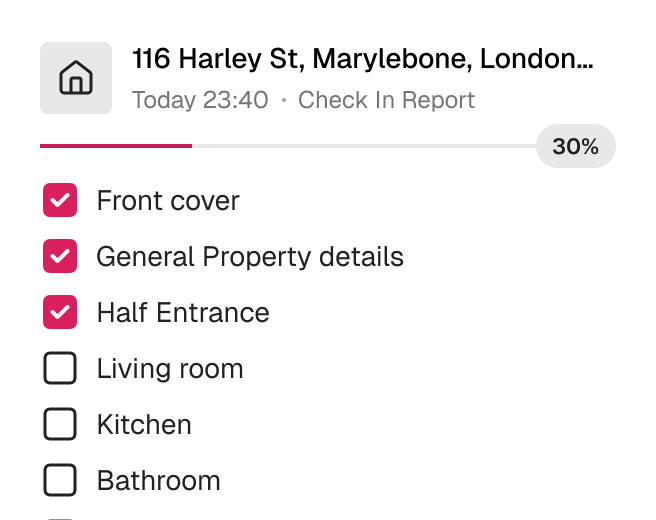
TouchRight mobile app part-way through a property inspection, showing a room-by-room checklist with progress.

Trusted by 600+ Property Professionals

Belvoir Martin & Co The Stow Brothers FHP Living Farrell Heyworth Altus Pinnacle Bradford Metropolitan District Council

What inspection report software does

Inspection report software turns an inspection into a finished document. Instead of notes, loose photos and a Word template to fill in later, you capture descriptions, condition ratings and timestamped photos on a phone or tablet as you walk the property, and the software produces a branded PDF report.

TouchRight covers the reports property teams produce most: inventories and schedules of condition, check-in and check-out reports, mid-term and routine inspections, HMO inspections and compliance checks, Legionella risk assessments, smoke and carbon monoxide alarm checks, Fitness for Human Habitation checks, and property visits.

What a good inspection report contains

A report is only as useful as the evidence in it. The best ones are specific, dated and item-level: what is there, what condition it is in, and a photo that proves it. For a rental, that usually means a room-by-room description of fixtures, fittings and furnishings, timestamped photos, meter readings, smoke and carbon monoxide alarm checks, keys, any existing damage, and a signature from the people involved. Our guide on how to write a property inspection report covers wording and examples in detail.

Consistency matters as much as detail. When every inspector uses the same template, with mandatory fields where you need them, reports read the same whoever carried out the visit.

Everything a report needs, captured on site

From the template to the finished PDF, TouchRight removes the desk work from producing a report.

Templates Built Around Your Reports

You are not forced into a generic layout. Choose from 20+ ready-made templates, build your own, or use our custom template design service to recreate the reports you already produce.

  • Mirror your existing paper or Word report
  • Your logo, layout and disclaimers on every page
  • Define mandatory fields for quality control
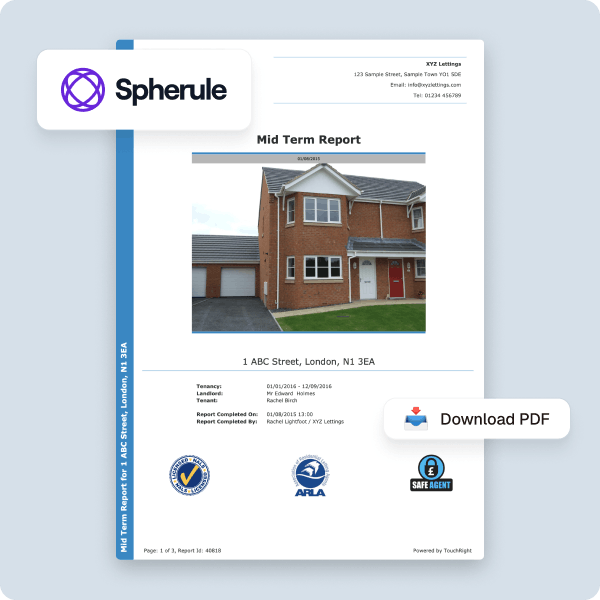
A branded TouchRight report template with a custom cover page and agency logo.

Photo Evidence, Properly Organised

Capture as many images as the property needs. Each one is timestamped and attached to the specific item or room it evidences, and a Photo Gallery button on the PDF opens a full-size online gallery.

  • Time and date stamped automatically
  • Attached to the item, not a loose folder
  • Full-size gallery linked from every PDF
Photos captured during an inspection, each timestamped and attached to the item it documents.

Report Assist AI Writes the First Draft

Report Assist generates photo descriptions and suggests condition wording as you work, so you are editing a draft rather than writing from a blank page. Every line stays under your control.

  • Descriptions generated from your own photos
  • Review and edit every line before it is final
  • Voice dictation for hands-busy input
Report Assist AI suggesting condition descriptions against inspection photos, each with edit and regenerate options.

Linked Reports Across the Tenancy

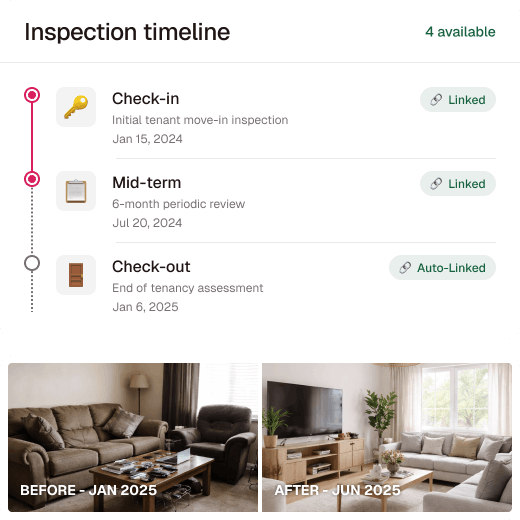
The inventory, check-in, mid-terms and check-out all sit on one property record, so a later report compares itself against the earlier one. Download a full comparison or a changes-only version.

  • Automatic linking between reports
  • Compare old and new photos side by side
  • Full or changes-only comparison reports
A tenancy timeline linking check-in, mid-term and check-out reports with before and after photos.

Produce your next report in TouchRight

See how much of the write-up disappears when the report is finished before you leave the property.

Say goodbye to Word templates and manual write-ups

Most teams do not abandon Word because it stops working. They abandon it because of one bad dispute, or one too many evenings.

Word and paper inspection reports compared with TouchRight across six criteria
 Word, paper and a cameraTouchRight inspection reports
Time to produceOn-site visit plus a desk write-upFinished before you leave
Photo evidenceLoose files in a folderTimestamped and attached to the item
Team consistencyDepends on the individualFixed by the template
Finding an old reportSearching inboxes and drivesOne searchable property record
Comparison with the last reportManual cross-referencingAutomatic side-by-side
Dispute evidenceVariableA dated audit trail built as you work

How it works

Four steps from booking the visit to sending the finished report.

  1. Set up the property

    Add the address, tenancy details and template, or let your CRM push the property across automatically.

  2. Walk the property

    Record condition room by room, dictating notes and capturing photos as you go. No signal needed.

  3. Let Report Assist draft it

    AI descriptions appear against your photos, ready for you to check, tighten or overrule.

  4. Generate and send

    Produce the branded PDF, send it for signature, and it is stored against the property for the life of your account.

Evidence that stands up when it is challenged

A property inventory is not legally required in England, but deposit scheme adjudicators expect one, and without it a landlord’s claim on a deposit is difficult to sustain. What adjudicators want is specific, dated, item-level evidence of condition at the start of the tenancy compared against the end.

Documented evidence matters more as the rules around possession change. Read our guide to inspections under the Renters’ Rights Act.

Who uses it

Letting agents

Standardise reports across your managed portfolio, whether that is thirty properties or three thousand, and give landlords output they are happy to receive.

Independent inventory clerks

Produce reports under your own branding for every agency you work with, and match whatever each client expects.

Property management companies

Keep report quality identical across offices and contractors, with templates controlled centrally.

Compliance and safety teams

Record Legionella, smoke and carbon monoxide, HMO and Fitness for Human Habitation checks with the same evidence trail as every other report.

Built for efficiency, trusted for accuracy

TouchRight has been producing property reports for UK agencies and clerks since 2012.

  • 600+Companies use TouchRight
  • 1.3M+Reports completed
  • 247k+Properties managed
  • 4.8 / 5Independent rating

Connect with the tools you already use

Sync TouchRight with leading property management and maintenance platforms, so report data flows into the rest of your systems.

  • Alto
  • Reapit
  • agentOS
  • Acquaint
  • SME Professional
  • Qube
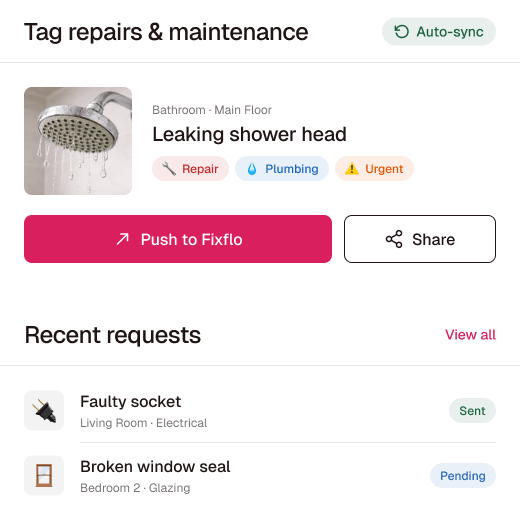
  • Fixflo
  • Signable
  • The Depositary

Plus an open API for anything not on the list. Learn more about Integration.

Flexible plans that adapt to you

Start your 30-day free trial with full access for up to 5 properties. No credit card required.

Monthly lite

£10 /month

Includes 4 reports a month, with extra reports at £2.50 each. Unlimited properties, 10 users and unlimited devices.

All inclusive

From £25 /month

Priced on portfolio size, with unlimited reports, users and devices. Account-lifetime report storage on every plan.

Switching is easier than you expect

Send us the reports you produce now and we will rebuild them as templates, so your output is familiar from day one. Run both systems in parallel for a single cycle of inspections, train your team on the app, then switch fully once everyone is comfortable.

Our UK-based team runs live webinars and step-by-step guidance from setup onwards. Browse sample reports to see the finished output first.

Frequently asked questions

What is inspection report software?

Inspection report software is a digital tool for capturing an inspection and producing the finished report. You record descriptions, condition and timestamped photos on a mobile app, then generate a branded PDF, instead of writing up notes and photos at a desk.

What types of inspection report can I create?

TouchRight covers inventories and schedules of condition, check-in and check-out reports, mid-term and routine periodic inspections, HMO inspections and compliance checks, Legionella risk assessments, smoke and carbon monoxide alarm checks, Fitness for Human Habitation checks, and property visits.

Can I use my own report templates and branding?

Yes. You can build your own templates, and our custom template design service will recreate your existing reports so the finished PDF matches what you produce today. Reports carry your branding, not ours.

Does inspection report software use AI?

Yes. Report Assist AI generates photo descriptions and suggests condition wording as you work, so you edit a draft rather than write from a blank page. You review every line, and nothing reaches a client unreviewed.

Does it work without an internet connection?

Yes. The TouchRight mobile app works fully offline on iOS and Android. You can download your appointments, complete the whole inspection and capture photos with no signal, and everything syncs to your dashboard when you reconnect.

Is TouchRight suitable for construction or industrial site inspections?

TouchRight is built for UK residential and property management inspections. If you need software for construction or industrial site inspections, ask us whether your use case fits before you start a trial.

How much does TouchRight cost?

TouchRight starts at £10 a month for the lite plan, which includes 4 reports a month, with extra reports at £2.50 each, unlimited properties and 10 users. The all-inclusive plan starts from £25 a month, is priced on portfolio size, and includes unlimited reports, users and devices. Report storage lasts for the life of the account on every plan.

Can I try it before I commit?

Yes. The 30-day free trial gives full access for up to 5 properties, with no credit card required, so you can run live inspections alongside your current tool before you decide.

Try it on your next inspection report

Start a free 30-day trial and produce a full report on a real property. No card required to begin.

600+ companies · 1.3M+ reports · AIIC partner · rated 4.8/5 on Kerfuffle

Simplify your property inspections with TouchRight

Start your free trial or book a quick demo to see how easy digital reporting can be.