



Property Management Inspection Software UK | TouchRight Skip to content

Property Management Inspection Software for UK Agencies and Managers

Run every inspection across your portfolio from one dashboard. Schedule visits, push them to your team’s phones, review reports before they reach the landlord, and flag repairs, with or without signal.

  • Drag-and-drop scheduler
  • Manager review before sending
  • Works fully offline
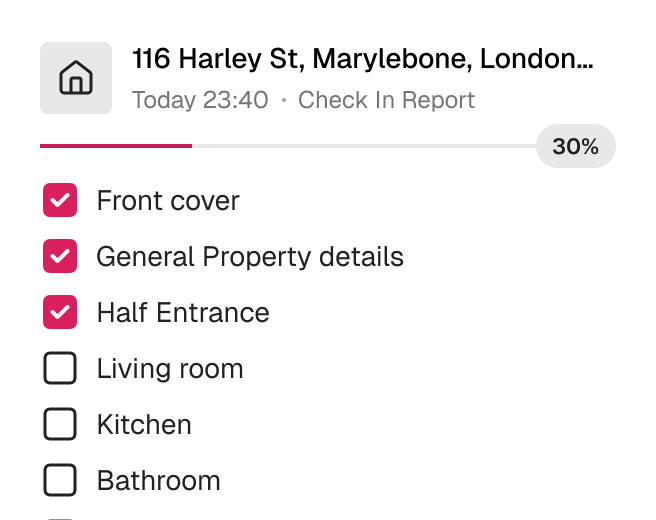
TouchRight mobile app part-way through a property inspection, showing a room-by-room checklist with progress.

Trusted by 600+ Property Professionals

Belvoir Martin & Co The Stow Brothers FHP Living Farrell Heyworth Altus Pinnacle Bradford Metropolitan District Council

What property management inspection software does

Property management inspection software is the system a letting agent or property manager uses to schedule, carry out, review and store inspections across a whole portfolio. It has two halves. The mobile app is what your inspector or clerk uses on site. The cloud dashboard is what you use to see who is doing what, check the work and send it on.

TouchRight connects the two. You schedule a visit and it appears on the clerk’s phone with the property details, they complete the inspection with timestamped photos, and the report syncs back to your dashboard ready for review. One property record carries every report through the tenancy, from the inventory to check-in, mid-terms and check-out.

The problem with managing inspections by email and spreadsheet

Most agencies do not struggle with doing inspections. They struggle with managing them. Jobs are assigned by phone call and text, progress is a matter of guesswork, reports arrive in inboxes in different formats, and nobody can say at a glance which properties are due, in progress or waiting for review.

The cost shows up when the team grows. Add a second clerk, a second branch or a few outsourced visits, and the admin of chasing, checking and re-keying grows faster than the portfolio does.

Everything you need to manage inspections at scale

From the first booking to the finished report, TouchRight keeps the whole process in one place.

Schedule and Assign in a Few Clicks

Use the drag-and-drop scheduler and visual calendar to schedule inspections, assign them to staff and track progress across your team. Appointments are pushed directly to the clerk’s mobile device with all the property details.

  • Push notifications to the app
  • Access codes and key information included with the job
  • Re-assign a job in one click

TouchRight mobile app part-way through a property inspection, showing a room-by-room checklist with progress.

A Bird’s-Eye View of Your Portfolio

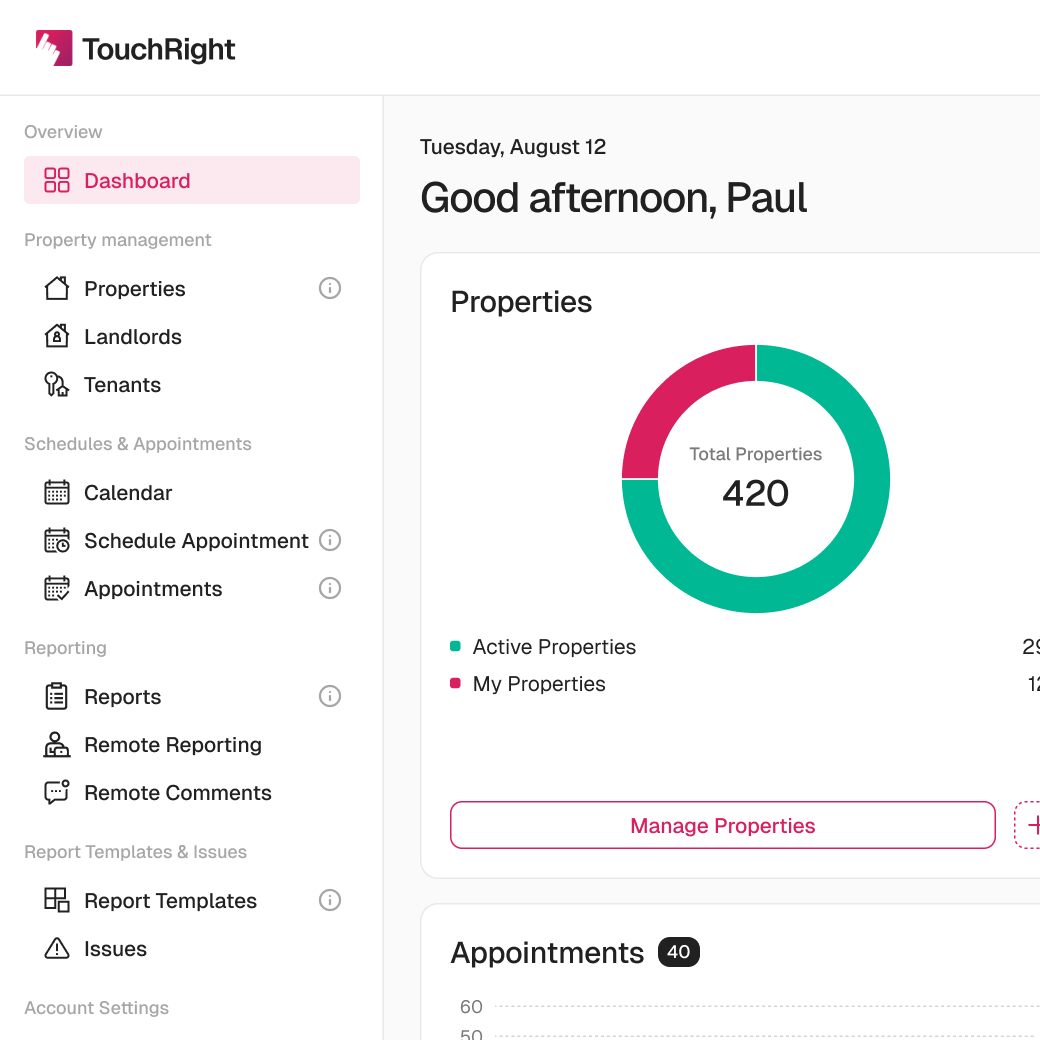
See which reports are scheduled, in progress or waiting for review, with live status updates instead of chasing by phone. Filter by property, clerk or status and jump straight to recent reports.

  • Scheduled, in progress and waiting for review
  • Filter by property, clerk or status
  • Works whether your clerks are in-house or outsourced
The TouchRight cloud dashboard listing properties, reports and appointments after syncing from the mobile app.

Quality Control Before the Landlord Sees It

Set up a review step so reports must be checked by a manager before they are sent to the landlord. Control who can see what, with roles, permission levels and branch-level privacy settings.

  • Manager review before sending
  • Admin and user roles with permission levels
  • Activity audit logs
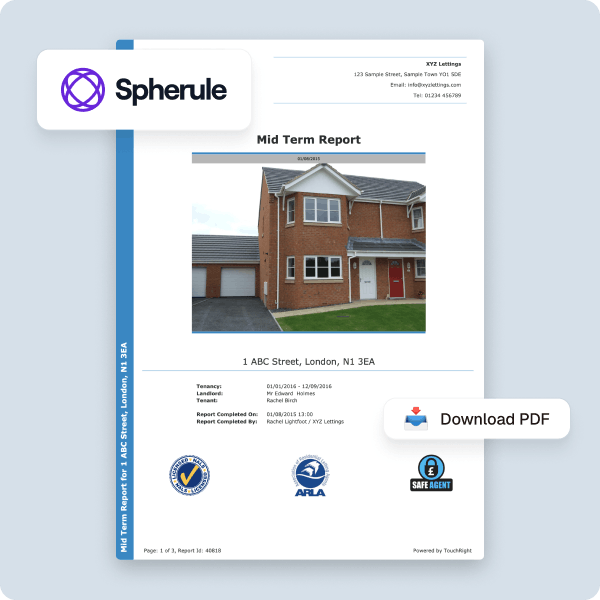
A branded TouchRight report template with a custom cover page and agency logo.

Linked Reports and Repairs That Do Not Get Lost

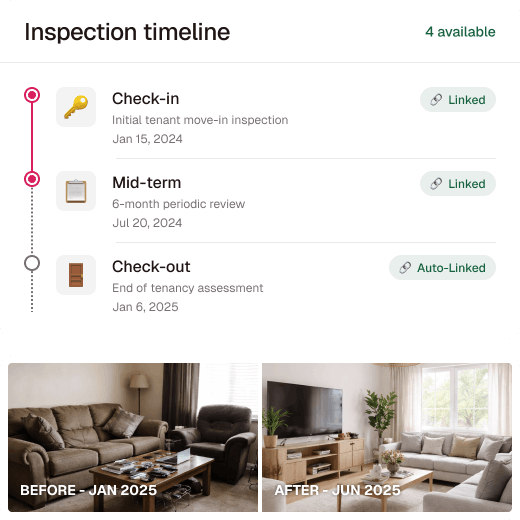
Check-in, mid-term and check-out inspections link automatically, so you always know what changed and when. Tag repairs while you inspect and push them directly to Fixflo or share them with contractors.

  • Automatic linking between reports
  • Old and new photos side by side
  • Repair tags with photos attached
A tenancy timeline linking check-in, mid-term and check-out reports with before and after photos.

Manage your next round of inspections in TouchRight

See how much chasing disappears when scheduling, inspecting and reviewing live in one system.

Say goodbye to email chains and guesswork

Most agencies do not leave spreadsheets because they stop working. They leave them when the team grows past what one person can keep track of.

Email and spreadsheet inspection management compared with TouchRight across six criteria
 Email, calls and spreadsheetsTouchRight
Assigning a visitPhone calls and textsPushed to the clerk’s phone with property details
Tracking progressGuesswork and chasingLive status on one dashboard
Quality controlWhenever someone remembersManager review before the landlord receives the report
Who can see whatWhoever has the shared driveRoles, permission levels and branch privacy
Repairs found on siteNoted, then re-keyed elsewhereTagged in the app and pushed to Fixflo or contractors
Finding an old reportSearching inboxes and drivesOne searchable property record

How it works

Four steps from booking the visit to sending the finished report.

  1. Schedule the visit

    Add the appointment on the calendar, or let your CRM push it across, and assign it to a clerk.

  2. Clerk downloads the job

    Assigned appointments are pulled to the device. The clerk opens the app and downloads appointments, then takes the job on site.

  3. Complete it in the app

    Record condition room by room, dictating notes and capturing photos as you go. No signal needed, and everything syncs when the clerk is back online.

  4. Review and send

    Check the report on your dashboard, edit if needed, then send it to the landlord and push any repairs on.

Every inspection type a property manager needs

TouchRight covers inventories and schedules of condition, check-in and check-out reports, mid-term and routine periodic inspections, HMO inspections and compliance checks, Legionella risk assessments, smoke and carbon monoxide alarm checks, Fitness for Human Habitation checks, and property visits. Each has its own workflow rather than one generic form.

Go deeper on mid-term inspection software, Legionella risk assessment software and lone worker protection, or see the inspection report software that produces the finished reports. For a practical walkthrough, read how to carry out a property inspection.

Who uses it

Small agencies

Start the same day with no setup fee or implementation project, and replace paper and spreadsheets with one system.

Growing agencies

Add clerks, branches and volume without adding admin, with scheduling, review and permissions already in place.

Multi-office and property management companies

Keep report quality identical across offices and contractors, with templates and permissions controlled centrally.

In-house and outsourced clerks

Give every clerk the same app and template, whether they are on your payroll or working for you by the visit.

Built for efficiency, trusted for accuracy

TouchRight has been producing property reports for UK agencies and clerks since 2012.

  • 600+Companies use TouchRight
  • 1.3M+Reports completed
  • 247k+Properties managed
  • 4.8 / 5Independent rating

Connect with the tools you already use

Sync TouchRight with leading property management and maintenance platforms, so appointments and property data flow in and finished reports flow back.

  • Alto
  • Reapit
  • agentOS
  • Acquaint
  • SME Professional
  • Qube
  • Fixflo
  • Signable
  • The Depositary

Plus an open API for anything not on the list. Learn more about Integration.

Flexible plans that adapt to you

Start your 30-day free trial with full access for up to 5 properties. No credit card required.

Monthly lite

£10 /month

Includes 4 reports a month, with extra reports at £2.50 each. Unlimited properties, 10 users and unlimited devices.

All inclusive

From £25 /month

Priced on portfolio size, with unlimited reports, users and devices. Account-lifetime report storage on every plan.

Switching is easier than you expect

Send us the reports you produce now and we will rebuild them as templates, so your output is familiar from day one. Run both systems in parallel for a single cycle of inspections, train your team on the app, then switch fully once everyone is comfortable.

Our UK-based team runs live webinars and step-by-step guidance from setup onwards. Browse sample reports to see the finished output first.

Frequently asked questions

What is property management inspection software?

Property management inspection software is a digital tool for scheduling, carrying out, reviewing and storing property inspections across a portfolio. Inspectors use a mobile app on site, and managers use a cloud dashboard to assign jobs, track progress and check reports before they are sent.

How do I assign inspections to my team?

Schedule the appointment on the calendar and assign it to a clerk. It is pushed to their mobile device with the property details, access codes and key information if you add them. You can re-assign a job in one click.

Can I check reports before the landlord sees them?

Yes. You can set up a quality control step so reports must be reviewed by a manager before they are sent to the landlord. Managers can edit reports before they go out.

Can I restrict what my clerks can see?

Yes. TouchRight has permission levels, and clerks would normally use the External User level, which shows only the properties and appointments where they are listed. It also prevents them from deleting properties or reports.

Does it work with outsourced clerks?

Yes. Whether you use in-house staff or outsourced clerks, everyone works in the same app on the same templates, and you see their progress on one dashboard.

Does it integrate with my property management system?

Yes. TouchRight integrates with Alto, Reapit, agentOS, Acquaint, SME Professional, Qube, Fixflo, Signable and The Depositary, and has an open API for anything not on the list.

How much does TouchRight cost?

TouchRight starts at £10 a month for the lite plan, which includes 4 reports a month, with extra reports at £2.50 each, unlimited properties and 10 users. The all-inclusive plan starts from £25 a month, is priced on portfolio size, and includes unlimited reports, users and devices. Report storage lasts for the life of the account on every plan.

Can I try it before I commit?

Yes. The 30-day free trial gives full access for up to 5 properties, with no credit card required, so you can run live inspections alongside your current tool before you decide.

Try it on your next round of inspections

Start a free 30-day trial and run real inspections across your team. No card required to begin.

600+ companies · 1.3M+ reports · AIIC partner · rated 4.8/5 on Kerfuffle

Simplify your property inspections with TouchRight

Start your free trial or book a quick demo to see how easy digital reporting can be.