Block management
Block management inspection software
Communal hallways, stairwells, bin stores, plant rooms and fire doors, across every block you manage. TouchRight records each area on site, with dated photographs against the item they show, and produces the report before you leave the building.
- Every communal area, in order
- Photos tied to the item
- Repairs tagged on the spot
- Works offline in plant rooms
Full access for up to 5 properties. No credit card required.

Used by 600+ companies and 6,100+ registered users across the UK






A block is not one property. It is twenty spaces with their own history.
One visit to a block can cover the entrance, the door entry system, hallways and landings, stairwells, the lift, the bin store, the car park, the gardens, the plant room and every fire door on the way. Each of those has its own things to check and its own record over time.
Recorded on paper or in a general Word template, they blur together. Six months later nobody can say with confidence when the bin store was last looked at, what the stairwell lighting was like, or whether the cross-corridor door on the third floor was closing properly at the last visit. Multiply that across a portfolio of blocks and the record stops being something you can rely on.
That record is exactly what gets asked for. A leaseholder raises a complaint about a communal area. A contractor disputes when a defect first appeared. A fire risk assessor asks what was found at the last door checks. The answer needs to be one report, found in a minute, not an afternoon of searching inboxes.
The practical test. If a leaseholder challenged the condition of a communal area tomorrow, how quickly could you produce the last inspection, the photographs and what was done about it? Minutes, or hours?
What the software does
Built around the building, not a single flat
The template follows the way your team walks a block, so every visit covers the same ground in the same order and each area keeps its own dated record.
Every communal area, recorded the same way on every visit
Build a template with an area for each part of the building: entrances, hallways, stairs, lifts, bin stores, car parks, gardens, roof access and plant rooms. Inspectors work through it in order, so nothing is missed because someone took a different route round the building.
- Your own areas, items and questions
- Consistent condition wording between visits
- Your current block report rebuilt as a template

Fire doors and safety checks that cannot be skipped
Add fire door checks to the template for communal doors and flat entrance doors, with a photograph against each one. Templates can make safety checks mandatory, so a report cannot be finished with the smoke alarm or carbon monoxide check left blank, and you can add your own questions for anything your fire risk assessment calls for.
- Self-closers, frames, glazing, seals and signage
- Mandatory checks before a report can be finished
- Each check dated and attributed to the inspector

Plant rooms, basements and car parks with no signal
The places hardest to record are usually the places with no connection. The app works fully offline on iOS and Android, so the inspection and the photographs are captured where they happen and sync to the dashboard when you are back in signal. Lone worker alerts with GPS location are there for the visits nobody else is on site for.
- Full offline working on phone or tablet
- Voice dictation for faster notes
- Lone worker alerts with GPS location

Defects tagged on site and followed through to the fix
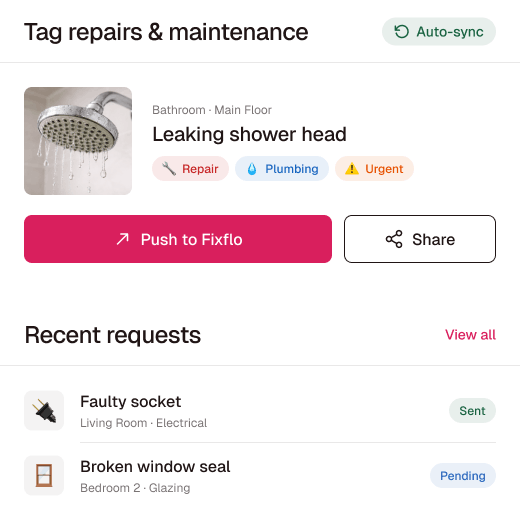
An inspection is often where an issue starts. Tag the broken light, the damaged wall or the door that will not close while you are standing in front of it, with the photograph attached, and push it to Fixflo or share it with a contractor. Linked inspections show the same item side by side at the next visit, so you can show it was put right.
- Repair tags with photo and location
- Push to Fixflo or share with contractors
- Old and new photos side by side
Fire door checks, recorded the way the regulations expect
In England, the Fire Safety (England) Regulations 2022 require the responsible person for a block with two or more flats and a top storey above 11 metres to check communal fire doors at least every three months, and to use best endeavours to check flat entrance doors at least every twelve months. The checks must include making sure self-closing devices work, and a record has to be kept of the steps taken, including any flat where access was not granted.
Government guidance says these checks are visual and can be carried out by managing agents, caretakers and maintenance staff with simple instruction, and that electronic means can be used to plan and record them. That is the part TouchRight does well: the check, the photograph, the date, the person and the follow-up, in one record per building.
- Door closes fully into its frame from wide open
- Door closes from around 15 degrees
- Self-closing device present and working
- Door, frame and glazing undamaged
- Intumescent strips and smoke seals intact
- Not wedged or held open
- Riser and cupboard doors kept locked shut
- Access refused, and what was tried
Where TouchRight fits, and where it does not. TouchRight records inspections and checks. It is not a fire risk assessment and it does not replace a competent fire risk assessor. What it gives you is the dated, photographed evidence of what was checked, by whom and what happened next, which is the part a spreadsheet tick box cannot show.
Clipboard and spreadsheet versus TouchRight
The same block inspection, run two ways.
| Paper, Word and spreadsheets | TouchRight | |
|---|---|---|
| Which blocks are due | A spreadsheet, if it is up to date | Scheduled, in progress and overdue on one dashboard |
| Communal areas covered | Whatever the inspector remembered | Every area in the template, in order |
| Photo evidence | Downloaded, resized and matched up later | Attached to the item on the spot |
| Defects found | Noted, then chased in a separate email | Tagged in the app and pushed to Fixflo or a contractor |
| Fire door record | A tick in a column | Dated check with a photo per door |
| Finding it in a year | Inboxes, shared drives and folders | Against the building, searchable |
Across every block
Inspection software for managing agents with a portfolio
Doing one inspection is simple. Running hundreds across dozens of buildings is the job.
Scheduling
See what is due, booked and overdue
Use the drag-and-drop scheduler to assign visits and push them to an inspector's phone with access codes and key information. The visits that slip are never the ones you would have chosen to skip.
Quality control
Review before the client sees it
Set a review step so management checks each report before it goes to the freeholder, the residents' management company or the client. Management can edit before sending.
Teams and contractors
Control who sees which buildings
Permission levels, branch-level privacy and activity audit logs. Outsourced inspectors and contractors see only the properties and appointments they are added to.
Your systems
Connected to the software you already run
Integrations include MRI Qube SLM, Reapit, Alto, agentOS, Acquaint, SME Professional, Fixflo, Signable and The Depositary, plus an open API. See integrations.
How it works
Four steps from walk-round to report
-
Build the block template
Set up the communal areas, fire doors and plant in the order your team walks them, or send us your current report and we will rebuild it.
-
Schedule every block
Assign visits on the calendar, or let your management system push them across, and see what is overdue at a glance.
-
Inspect on the app
Walk the building on a phone or tablet, with or without signal. Photos, notes and repair tags attach as you go.
-
Review and send
Check the report on the dashboard, send the branded PDF and push repairs on. The report stays against the building.
- 1.3m+Inspection reports completed
- 247k+Properties managed
- 8.8m+Photos captured as evidence
- 4.8 / 5Independent rating
TouchRight has completely transformed how we handle inspections. Reports are faster, cleaner, and look far more professional.
Sarah L., ManagerLovelle
Templates that sit alongside your block reports
Your block template is your own. These ready-made templates cover the other inspections a managing agent is often asked for. Preview the output on sample reports.
- Commercial site inspectionCompliance, health and safety, damp and access security
- Legionnaires risk assessmentWater systems in common parts
- Legionnaires risk assessment reviewPeriodic review
- HHSRS inspectionHazards in individual flats
- Landlord maintenance reportDefects and action
- Property inspection reportPeriodic visits to let flats
Questions managing agents ask
What is block management inspection software?
It is the system a managing agent uses to plan, carry out and record inspections of the communal parts of residential blocks and estates. Inspectors work through a template on a phone or tablet, photographs attach to the item they evidence, and the software produces a dated report for the freeholder, the residents' management company or the client, with defects tagged for follow-up.
Is there a block management template?
You build the template around the way your team inspects a block, with an area for each communal space and your own questions for fire doors, plant rooms and anything else your fire risk assessment calls for. If you already use a block inspection report, we will rebuild it as a template so your output looks familiar from the first visit. See templates and report design.
Can TouchRight record fire door checks?
Yes. Add fire door checks to your template, including self-closers, frames, glazing, intumescent strips and smoke seals, with a photograph against each door. Each check is dated and attributed to the person who carried it out. TouchRight records the checks. It does not replace a fire risk assessment by a competent assessor.
Does it work in plant rooms and basements with no signal?
Yes. The app works fully offline on iOS and Android. Complete the inspection and take photographs with no connection, and everything syncs when you are back in signal. See mobile app and on-site inspections.
Can contractors and outsourced inspectors use it?
Yes. Everyone works in the same app on the same templates. Permission levels control what each person can see, and the External User level shows a contractor only the properties and appointments they are added to, without the ability to delete properties or reports.
How much does it cost?
Monthly Lite is 10 pounds per month and includes four reports a month, with further reports at 2.50 pounds each. All Inclusive starts at 25 pounds per month, is priced on portfolio size and includes unlimited reports, users and devices. Full detail is on pricing.
Walk one of your blocks with it
Start the trial and inspect a real building this week, or book a demo and we will set up a template around one of your own blocks.
Full access for up to 5 properties. No credit card required.